WICShopper
- 4.8
- Rating
- 1.00M
- Installs
- Free
- Price

 Analysis by App-foxy
Shopping with WIC can become stressful when you are trying to remember eligible items, check a balance, and keep a busy checkout moving at the same time. I found WICShopper most useful as a practical companion for those moments rather than as a general shopping app. It is free, focused on WIC participants, and built by JPMA, Inc. The app has earned a 4.8 average from around 108 thousand ratings, with more than a million installs, which matches my impression that it is a well-established tool rather than a niche experiment.
What makes it worthwhile is the way it brings several WIC-related tasks into one place. Instead of relying only on memory, paper notes, or a separate store app, I can use it to prepare before shopping and make better decisions while I am in the aisle. It does not remove every complication from WIC shopping, but it can reduce the guesswork that usually causes frustration.
How I use WICShopper from planning to checkout
I use WICShopper as one part of a shopping routine: I plan meals and quantities first, then check unfamiliar WIC choices before they become checkout surprises. Keeping those jobs separate makes the app easier to use when the store is busy, and it gives me a clearer way to recover if a planned item is unavailable or causes a question at the register.
You May Also Like

 Blood Strike: 2.5 Anniversary
Blood Strike’s Loadouts Turn Every Drop Into a Tactical Gamble
A close look at Blood Strike’s custom loadouts: how fast access to signature weapons reshapes its battle royale rhythm, rewards preparation, and narrows the gap between fights.

 Pandora - Music & Podcasts
Pandora’s Music Is Easy to Start, but Harder to Recover
Pandora’s strength is its low-effort path from a seed to a station. Its weak spot is how much confidence it asks you to place in connection, setup, and quiet recovery.

 8 Ball Pool
 Is Built on Rivalries, Rematches, and Routine
A close look at the rivalries, rematches, shared routines, and unanswered safety questions that turn a quick pool match into a persistent mobile community.

 Samsung Music
’s Quiet Strength Is Playing What You Already Own
Its reach comes less from spectacle than from dependable access to a personal library. That simplicity is both the app’s strongest retention engine and its ceiling.

 AccuWeather: Weather Radar
AccuWeather Review: A Quick, Clear Forecast for Everyday Decisions
For everyday plans, the best forecast is the one you can understand quickly. AccuWeather makes rain timing, radar, and local conditions easy to act on, with a few trade-offs.

 Hill Climb Racing
Why Hill Climb Racing Still Turns Crashes Into One More Run
A tiny car, a bumpy hill and one more upgrade: Hill Climb Racing keeps resurfacing because its simple chaos makes every near-miss feel personal.
More From Our News Desk



A useful starting point before leaving home
My preferred workflow begins before I enter a store. I first think through the meals and staples I actually need, then use the app to make the shopping trip more deliberate. That small change matters because WIC shopping is not simply a matter of choosing any product from a broad grocery shelf. Package size, product type, and eligibility can all affect whether an item fits the benefits available to me.
I would not treat the app as a replacement for a shopping list. A list still helps me avoid wandering around and buying items that do not support the week’s meals. The better combination is to use a normal list for quantities and household needs, then use WICShopper as a checking tool for WIC-specific decisions. That division keeps the app from becoming overloaded with tasks it was not designed to handle.
For a realistic example, imagine that I am shopping for cereal, milk, beans, and baby food. I can prepare the list at home, identify the products I am considering in the store, and check the app when I am uncertain. If a familiar-looking package is different in size or formulation from the one I usually buy, the app gives me a reason to pause instead of discovering the problem only at the register.
This is especially helpful for new participants. Experienced shoppers often develop a mental list of dependable products, but that knowledge takes time. A dedicated WIC tool makes the learning period less intimidating because I have somewhere to verify choices instead of asking a cashier to explain every item while other customers wait.
Checking products without turning every aisle into research
The most valuable habit is selective checking. I do not need to inspect every product when I already know it works for my benefits. I use the app for exceptions: a new brand, a changed package, an unfamiliar flavor, or an item that looks similar to something I have bought before. This keeps the process quick while still protecting me from avoidable mistakes.
That approach also makes the app more useful for families. A shopper may know which products are normally accepted but still need to make substitutions when a shelf is empty. Rather than abandoning the category, I can compare another option and use the app to support the decision. The benefit is not just confirmation; it is confidence when the original plan has to change.
What happens when the checkout does not go as planned
I would still leave room for normal checkout friction. A product may appear eligible during planning but create a question at the register because of package details, store handling, or the way the purchase is processed. WICShopper can help me prepare, but it cannot make the cashier’s system behave differently or guarantee that every local shopping situation will be perfectly straightforward.
For that reason, I keep the app open before reaching the checkout rather than waiting until a problem appears. I also separate WIC items from unrelated groceries when possible. That makes it easier to identify which product caused an issue and avoids the confusion of trying to reconstruct the entire cart under pressure.
If a transaction does not work, I see the app as part of the evidence-gathering process, not as an argument to have with the cashier. I check the item again, listen to the store’s explanation, and make a note of what happened. That calm workflow is more useful than assuming the app alone can settle every disagreement.
Settings and account details worth checking
One of the first things I would review is the selected WIC program or state information, if the app asks for it during setup. WIC rules and approved products can be tied to the participant’s local program, so choosing the wrong location can make an otherwise helpful tool misleading. This is not a setting I would skip just to finish setup faster.
I would also check whether the app has the correct participant information and benefit details available for the account or program being used. The exact screens can vary by version and local implementation, so I avoid assuming that every participant sees the same options. The important habit is to verify the setup before relying on the app during a large shopping trip.
The current version is 5.2.26, and it requires Android 8.0 or later. That makes compatibility worth checking before recommending it to someone with an older phone. The app is rated for Everyone, which fits its practical family-oriented purpose, but an age rating does not tell me whether a particular device or local WIC setup will provide the same experience.
I also prefer to review the app when I have a stable connection and enough time to understand the available tools. A rushed first launch in a supermarket is a poor moment to discover that I need to select a program, sign in, or clarify account information. A few minutes at home can prevent a much more awkward pause beside the checkout.
Repeatable habits that make shopping faster
The fastest pattern I found is to separate preparation, verification, and checkout. During preparation, I decide what the household needs. During verification, I use WICShopper only for uncertain products. During checkout, I keep the cart organized and avoid making last-second substitutions unless I have a clear reason. This three-step rhythm is faster than opening the app randomly for every item.
Another helpful habit is to remember successful substitutions. If the app helps me confirm an alternative product, I can add that product to my personal shopping notes for the next trip. The app remains the authority I consult when needed, while my own notes become a shortcut for familiar purchases. Over time, this reduces repeated checks without asking the app to remember preferences that may not be part of its design.
I also recommend checking benefits before shopping rather than building a cart around assumptions. A family may have enough benefits for one category but not another, or may be planning a trip near the end of a benefit period. Knowing the available situation first helps me avoid buying a large quantity of one item and discovering that another essential category was overlooked.
When shopping with children, I find that a short list of dependable products is more realistic than trying to compare every possible option. I can check unfamiliar items while the child is settled, then move through the rest of the store using the list. This is a small workflow improvement, but it addresses the real reason many shopping tools fail: they ask for too much attention at the worst possible time.
For a partner, relative, or caregiver who shops on my behalf, I would share the process rather than simply saying “use the app.” I would explain which products are routine, which categories need checking, and what to do if something fails at checkout. WICShopper is more effective when everyone involved follows the same verification habit.
Where it is stronger than ordinary shopping alternatives
A standard grocery app is usually better for store-specific prices, digital coupons, aisle locations, or delivery orders. A general barcode or nutrition app may provide broad product information. Neither one is necessarily built around the practical question a WIC participant faces: “Can this particular choice work with my benefits?” That focus is the main reason I would choose WICShopper over a generic shopping companion.
Paper lists still have advantages. They work without a battery, are easy to hand to another shopper, and can be customized with household quantities. Notes apps are also faster for a simple list and may be more familiar to someone who does not want another account or setup process. I would use either of those alongside WICShopper rather than treating them as competitors.
A store’s own app may be the better choice when the priority is finding an item, comparing prices, or arranging pickup. WICShopper is not the tool I would open to manage an entire supermarket order. Its value is narrower and more important: helping me make WIC-related choices with less uncertainty.
Limits that experienced users should understand
The app cannot replace reading the package or paying attention to the actual item in my cart. Similar packaging can hide meaningful differences, and a product that looks like a familiar choice may not be identical. I still inspect size, type, and labeling instead of assuming that a scan or search result removes the need for judgment.
I also would not expect it to solve every local policy question instantly. WIC programs can involve local rules, approved product details, and benefit situations that require clarification beyond a phone screen. When the app and the checkout experience seem to disagree, I treat that as a signal to ask the appropriate WIC office or store staff rather than forcing a purchase.
There is also a human-factor limitation: using any app while pushing a cart, supervising children, and comparing products can be tiring. If I check too many items, the tool becomes a source of delay instead of a shortcut. The best results come from preparing a small number of likely choices and using the app for decisions that genuinely need confirmation.
People who want a complete grocery planner may find the experience too specialized. Someone mainly looking for coupons, delivery, recipes, or price tracking should choose a different primary app. WICShopper makes more sense when WIC eligibility and benefit management are central to the trip.
Who should use it and who may want another tool
I would recommend it to new WIC participants, caregivers who shop for someone else, families that frequently substitute products, and anyone who feels uncertain at the shelf. It is also useful for experienced shoppers when a store changes its stock or when a product’s packaging makes it difficult to tell whether it matches a familiar choice.
I would be more cautious recommending it as the only shopping tool to someone with an older Android device, limited comfort with account setup, or a need for detailed store logistics. The Android requirement begins at version 8.0, and the app’s WIC focus does not replace the convenience features found in a supermarket’s own application.
iPhone users should still judge the experience by the options available for their device and local WIC program rather than assuming that every screen behaves identically across platforms. The important question is whether the app supports the participant’s actual program and shopping routine. A tool that is technically available but poorly matched to the user’s local needs will not be helpful enough.
My verdict after building a routine around it
I see WICShopper as a focused utility that earns its place through practical timing. It is most valuable before and during the uncertain parts of a shopping trip: preparing choices, checking substitutions, and reducing surprises at checkout. I would not use it to replace a list, a store app, or common sense, but I would gladly keep it alongside those tools if WIC benefits shaped my grocery decisions.
The strongest result comes from a repeatable routine: confirm the program setup, plan the household’s needs, check only unfamiliar or questionable products, keep the cart organized, and record successful alternatives for later. That workflow turns the app from something I open in a panic into a quiet reference I use with purpose.
Its limitations are real, but they are mostly boundaries rather than failures. It is not a universal grocery assistant, and it cannot settle every local or checkout issue. For the right user, though, its specialization is exactly the point. I would recommend trying WICShopper if WIC shopping currently feels like a guessing game, especially during the first few trips or whenever substitutions are unavoidable.
With its free price, Everyone content rating, established presence since January 11, 2013, and strong reception from users, it is an easy tool to test without adding a purchase decision to an already complicated shopping task. My final advice is simple: use it as a verification layer, not as your entire shopping system. That is where I found its practical strength.
FAQs for WICShopper
01What is WICShopper and how does it work?
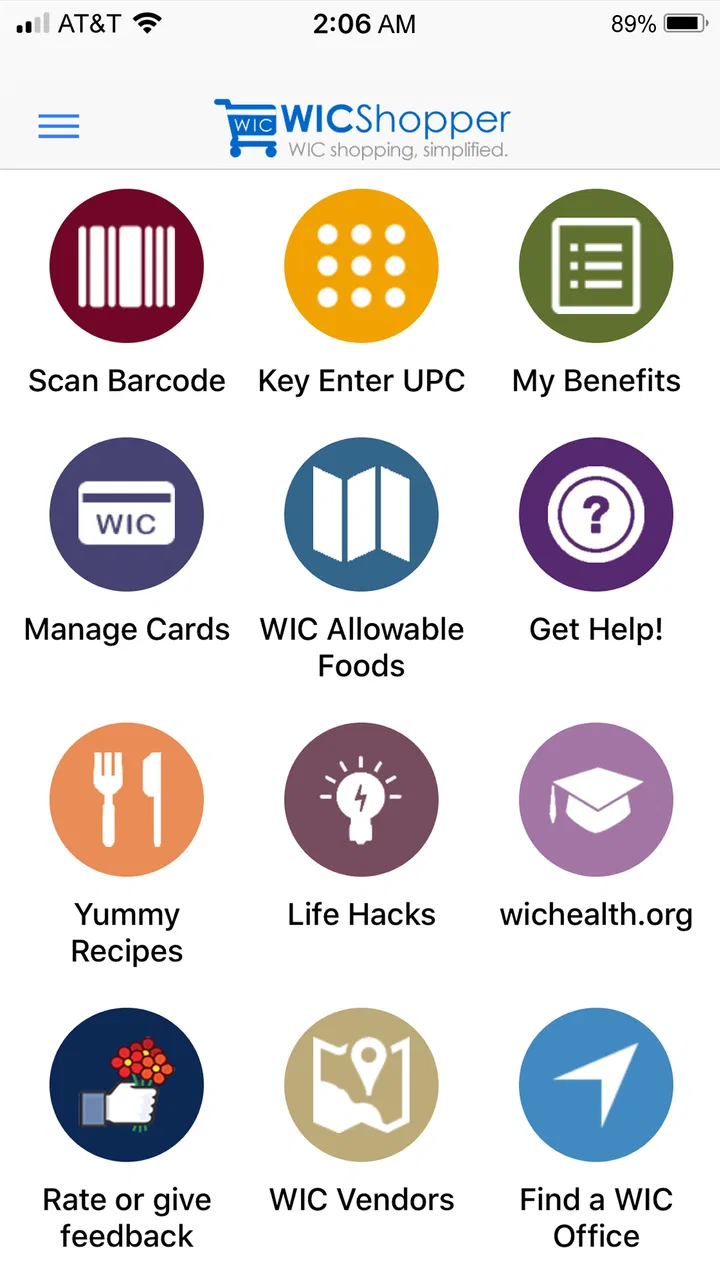
WICShopper is a mobile app designed to help users easily manage and track their WIC (Women, Infants, and Children) benefits. By scanning barcodes, the app verifies if items are WIC-approved, ensuring users make the right choices during shopping. It also provides updates on benefits balance and store locations.
02Is WICShopper available for both Android and iOS devices?
Yes, WICShopper is available for download on both Android and iOS platforms. You can find it on the Google Play Store for Android devices and the Apple App Store for iOS devices. Ensure your device meets the app’s minimum operating system requirements for optimal performance.
03How can I check my WIC benefits balance using WICShopper?
To check your WIC benefits balance, you need to log into the WICShopper app with your WIC account details. Once logged in, navigate to the benefits section where your current balance and expiration dates for each benefit category are displayed. This helps you plan your shopping effectively.
04Can I use WICShopper to find WIC-approved stores near me?
Yes, the WICShopper app provides a feature to locate nearby WIC-approved stores. By enabling location services on your device, the app can show a list of participating stores in your vicinity, along with their addresses and contact information, making it easy to plan your shopping trips.
05Does WICShopper require an internet connection to function?
WICShopper requires an internet connection for certain features, such as updating your benefits and locating stores. However, once items are scanned, the app can often verify product eligibility offline, though having connectivity ensures the most accurate and updated information.
Pros
- User-friendly interface enhances shopping experience.
- Barcode scanner for quick product checks.
- Customizable shopping lists for convenience.
- Access to store-specific promotions and deals.
- Real-time balance updates for easy tracking.
Cons
- Limited to participating stores only.
- Requires stable internet for full functionality.
- Occasional app crashes reported by users.
- Some features require frequent updates.
- Not available in all regions or states.

WICShopper
Gallery